
Proposal for discussion
Managed classroom video for Your District
A proposal for kindergarten to grade 5 across 6 schools, starting with a one-school pilot.
- District
- Your District, IL
- Grades
- K-5
- Schools
- 6
- Prepared for
- District leadership
1Why now
Classroom video is no longer only a teaching choice; it is becoming a policy matter. As of August 2026, seven states had passed classroom screen-time laws or directives, and large districts have written their own.1 Los Angeles Unified, for example, limits kindergarten to grade 2 to 60 minutes a day and grades 3 to 5 to 90 minutes a day from 2026-27.2 Dallas ISD limits elementary and middle school classroom screen time to under two hours a day.3
Reporting in the Wall Street Journal found districts that judged YouTube's Restricted Mode not good enough, and students who got around blocks through links in shared documents.4 The question a board now asks is not whether video is allowed, but who chose it, for which children, and whether anyone can show the record.
2How Backpack works
Backpack lets Your District manage classroom video the way it manages other instructional material. Everything below works in the product today.
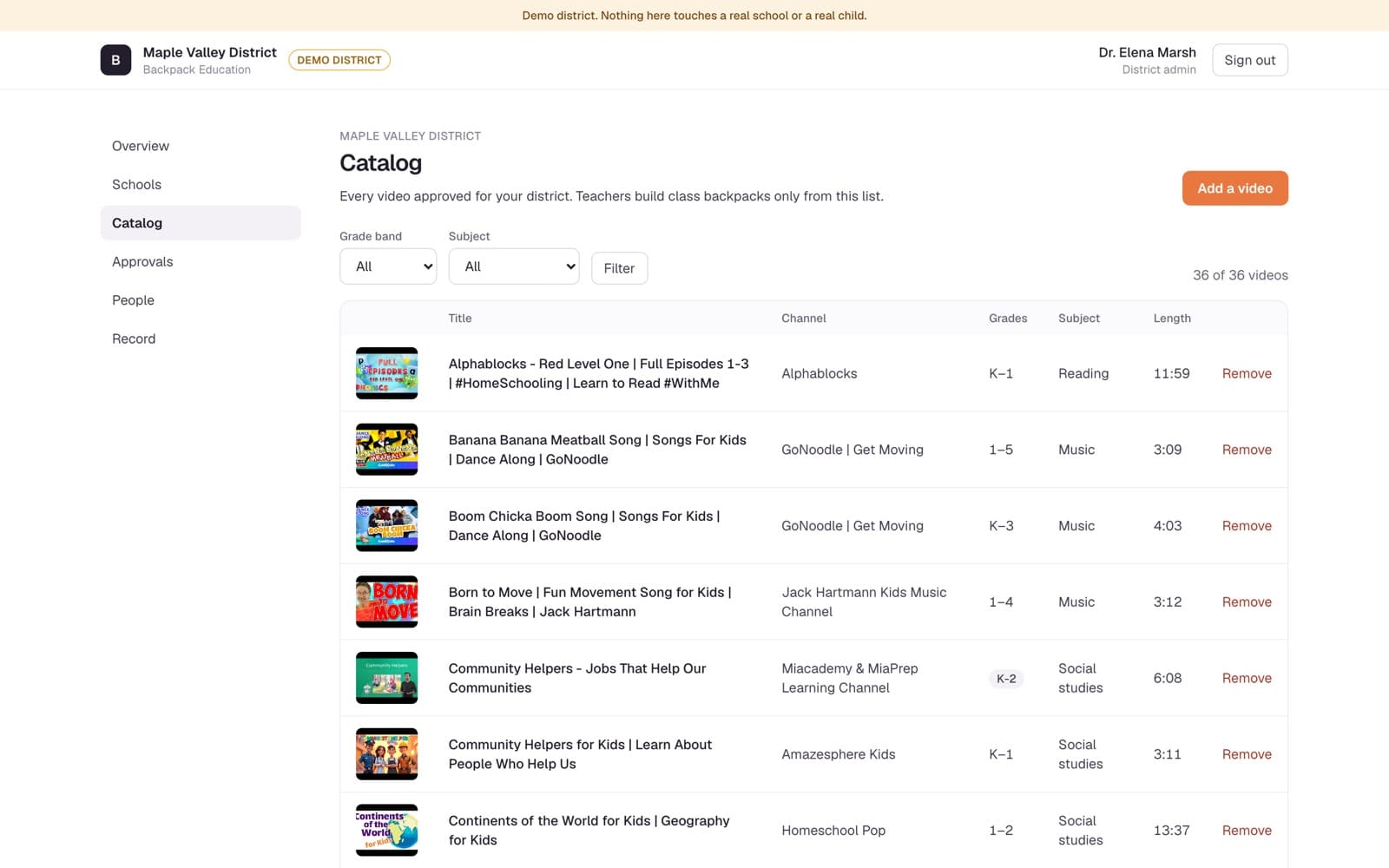
- The district keeps one catalog of approved videos, sorted by grade band and subject. Removing a video from the catalog removes it everywhere in the district, including from class backpacks already packed.
- Each school names who approves new videos for each grade band. In this proposal new videos are approved by each school's principal.
- A teacher packs a class backpack from the catalog in a few taps, reuses it with another class, and can request a video that is not in the catalog yet. The request goes to the school's approver.
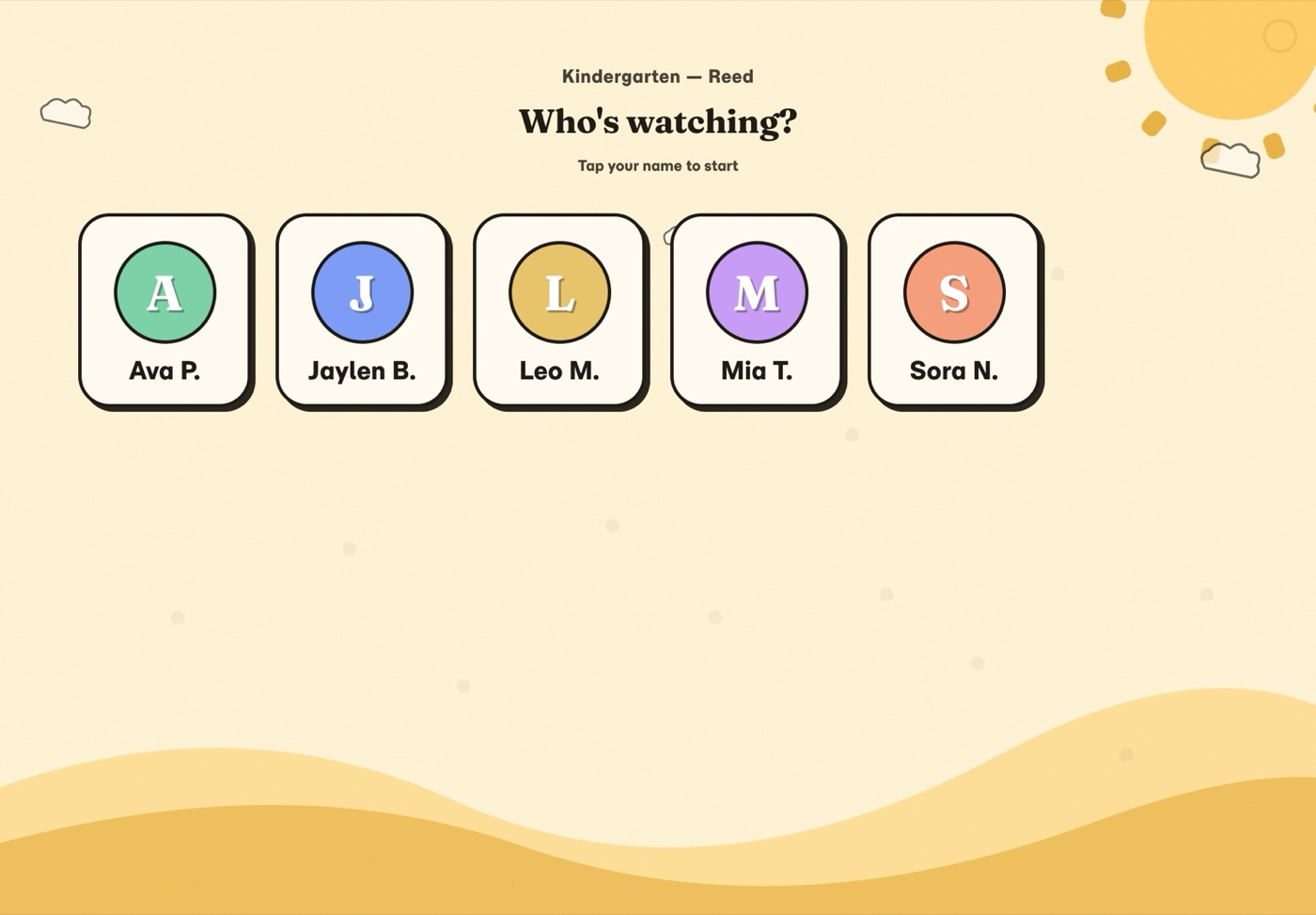
- Children watch on a classroom tablet that the teacher signs out. Each child taps a tile with their colour and first name and initial. There are no photos of children anywhere in Backpack, and children in K-2 have no passwords.
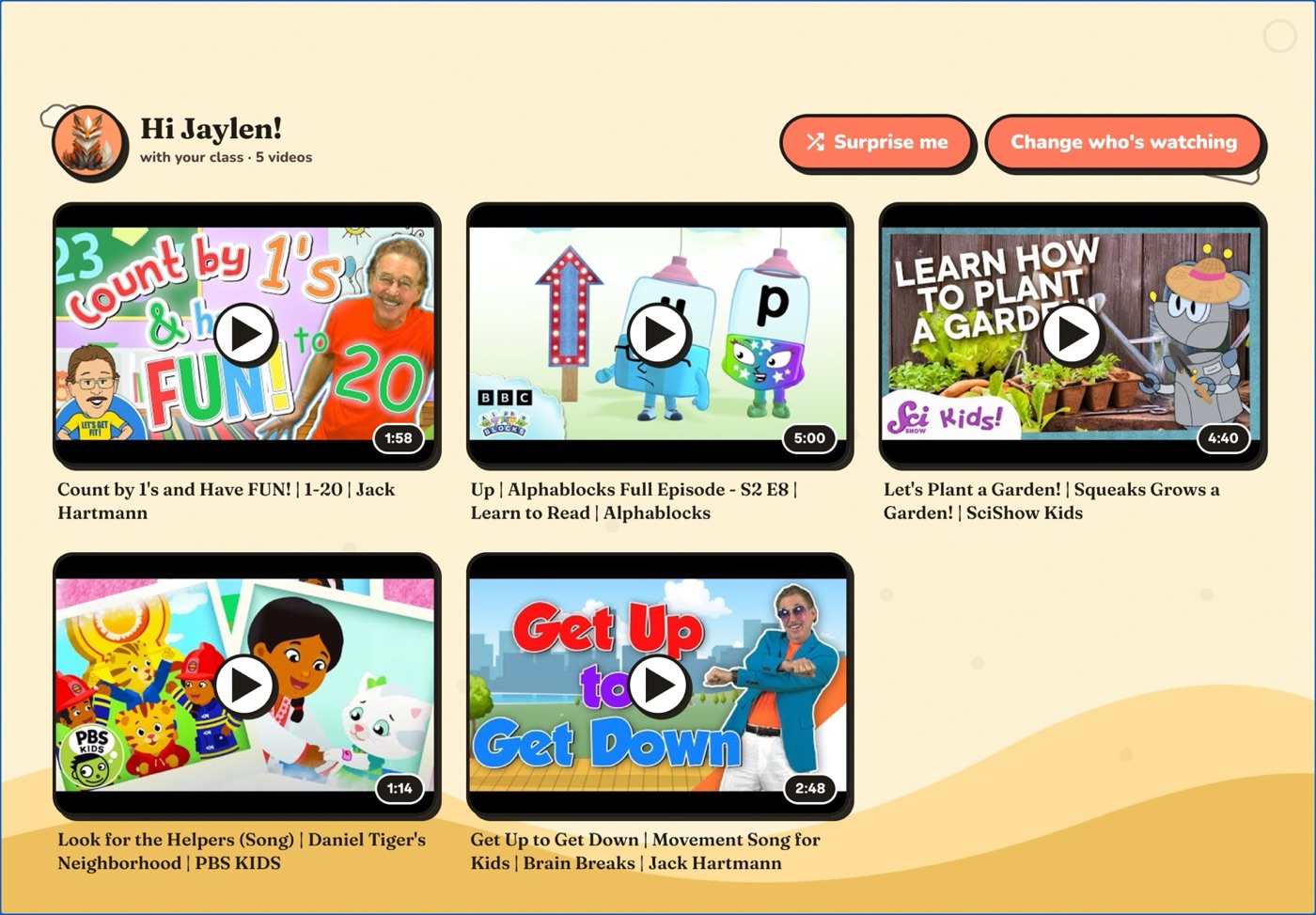
- A child sees only the videos the teacher packed. There is no search box, no feed and no suggested videos.
- Each view is recorded and shown on two screens: the teacher's, for their class, and that child's parent's. No principal or district screen shows viewing records, and there is no aggregate report of them.
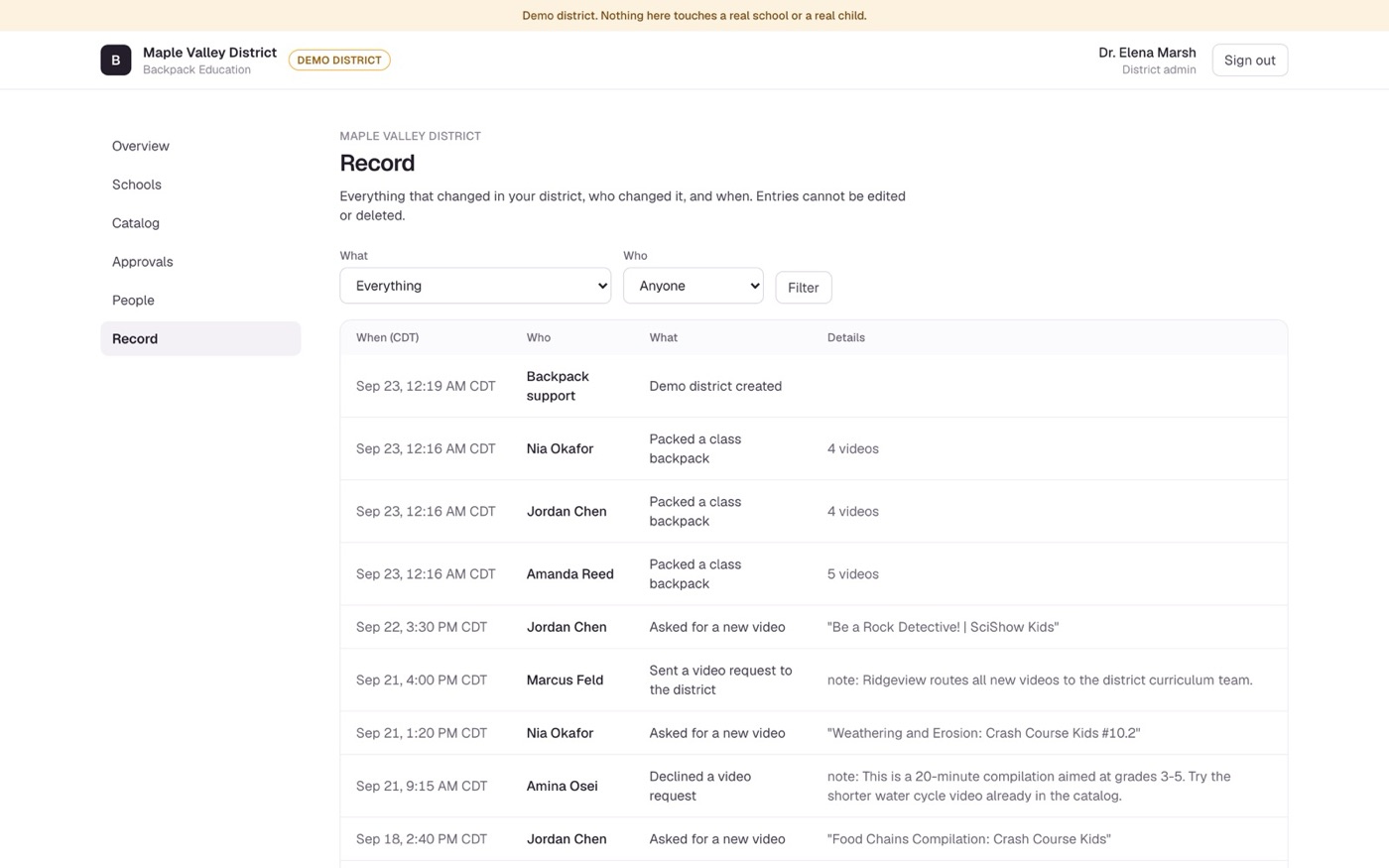
- The district's Record lists every change in the district, who made it and when. Entries cannot be edited or deleted.
3Privacy and Illinois's agreement
The Illinois Student Online Personal Protection Act (SOPPA, 105 ILCS 85) requires a district to sign a data privacy agreement with an operator before sharing student data, and to post it. The IL-NDPA is signed once by the operator at registry level and can then be adopted by any Illinois district.5
Backpack will sign the Illinois National Data Privacy Agreement (IL-NDPA V1.0a) with Your District before any pilot; no pilot without it. We have not signed it with any Illinois district yet.
- No advertising. No targeted advertising to students, on any screen, ever. It is a term of our Data Processing Agreement and of every state student data privacy agreement we sign.
- No profiling. No behavioral profile of a student built or used except in direct furtherance of the K–12 purposes in the schedule of data above.
- No sale of data. Student data is never sold, rented, or traded. Not to anyone, not for any reason.
- No model training. Student data is never used to train machine-learning models, ours or anyone else's.
- Row-level tenant isolation. Every district-scoped table carries an organization identifier, enforced by PostgreSQL row-level security, so one district's staff cannot read another district's rows. An automated suite attempts cross-district reads on every change proposed to the Education code.
No analytics, advertising or AI-model training service receives covered information. The only session recording is the masked error replay described for Sentry above. Backpack's consumer product also uses a subscription platform; Backpack Education runs as a separate deployment with its own settings and its own database, and no Education page calls that platform.
4What we keep about a child
- Student identifiers. Roster identifier, first name, last initial, grade, school, colour, and class enrollments — for picking a child's tile on the classroom tablet and matching a student to their teacher's class backpack.
- Guardian contact. The email address a parent types when connecting with the code on their child's family letter — for that parent's sign-in links and their read-only view of their own child.
- Usage. Video identifier, class, start time, seconds watched, whether it finished, and tablet session identifier — for the teacher's view of what their class watched, the parent's view of their own child, and the district's own data export.
Never collected: Date of birth, home address, photographs of any student, free-text student input, search queries, location data, biometric data, disciplinary or special-education records, assessment scores.
Retention the district sets. A district admin sets how long viewing records are kept (30 days to three years; default 365). Viewing records older than that are purged nightly, and each change and each purge is written to the district's audit log. The setting covers viewing records only; student, staff and family records are not purged by it.
Deletion on offboarding. Student data is disposed of at the earliest of the district's written direction, 60 days after a student's roster record becomes inactive, or 90 days after the end of the term (shorter on the district's election). Backpack staff carry out the deletion; when a whole district is deleted, a certificate of deletion listing what was deleted is emailed to its admins. The database's restore history is at most 30 days, so a deletion is gone from it within 30 days.
5Pilot plan: one school
The pilot is one school out of Your District's 6 schools, chosen by the district. No purchase order is needed to begin.
- Walk through the demo district. A demo district, with fictional schools, staff and children, that anyone on your team can sign into today as a district admin, principal, teacher, classroom tablet or parent.
- Sign the Illinois National Data Privacy Agreement (IL-NDPA V1.0a). Nothing touches a real child's data before it is signed.
- Agree how the pilot school's class lists reach Backpack before the pilot starts.
- The school names its approver for each grade band (each school's principal); teachers pack their first class backpacks from the catalog.
- Children in kindergarten to grade 5 watch on classroom tablets with picture sign-in, signed out by the teacher.
- At the end, the district reviews the Record and what the teachers saw, against success measures it set before the pilot started. Then it decides: expand to more schools under an order form, or stop, in which case pilot data is deleted under the signed agreement.
Plan for the decision to take time: in one survey of district leaders, 37% said it takes 6 to 11 months from identifying a need to buying.6 A one-school pilot is meant to make that time useful.
6Questions to ask us
- What happens to our data if Backpack closes?
- If Backpack stops offering Backpack Education, every district gets at least 90 days' written notice, sent to its Data Steward.
- Within 30 days of that notice, or sooner if the district asks, Backpack delivers a complete export of the district's data: schools, classes, staff, students, class enrollments, the catalog, class backpacks, requests, viewing records and the district's audit record, in a machine-readable file. A district admin can also download the district's export from the district console at any time.
- 30 days after the export is delivered, unless the district directs a different date, a Backpack operator deletes the district's data and a certificate of deletion is emailed to the district's admins. The database's restore history is at most 30 days, so the data is gone from it within 30 days after that.
- The same steps apply when a single district leaves: export first, then deletion on the date the district sets, at most 90 days out.
- Who else handles our data?
- 7 subprocessors, all in the United States: Vercel, Inc.; Neon, Inc.; Resend, Inc.; Google LLC, YouTube; Google LLC, Google sign-in; Google LLC, Workspace; Functional Software, Inc. (Sentry). The list is versioned (version 2026.4) and published at education.backpack.kids/trust.
- What happens if there is a breach?
- The district's Data Steward is notified of a breach of covered information within 72 hours as our target, and no later than 30 calendar days after Backpack determines a breach occurred, with the information the district needs to meet its own notice obligations to families.
- Can a child find other videos on YouTube from Backpack?
- A child sees only the videos the teacher packed. There is no search box, no feed and no suggested videos. Playback uses YouTube's privacy-enhanced embed (youtube-nocookie.com), and no student identity is sent to Google.
Sources
- EdWeek Market Brief, "What do state and district screen-time policies actually look like?", August 2026. https://marketbrief.edweek.org/regulation-policy/what-do-state-district-screen-time-policies-actually-look-like-heres-what-we-know/2026/08
- ABC News, "LA school district approves new screen time limits", 2026. https://abcnews.com/GMA/News/la-school-district-approves-new-screen-time-limits/story?id=134161969
- KERA News, Dallas ISD screen-time limits for elementary and middle schools, 21 September 2026. https://www.keranews.org/2026-09-21/disd-screen-time-limits-elementary-middle-schools
- The Wall Street Journal, "How YouTube took over the American classroom" (read via El Paso Inc. reprint), 29 April 2026. https://www.elpasoinc.com/wjournal/how-youtube-took-over-the-american-classroom/article_71958104-f96a-43ad-800b-43862fea30e0.html
- Student Data Privacy Consortium, Illinois agreement information, checked 22 September 2026. https://sdpc.a4l.org/agreement_info.php?state=IL
- EdWeek Market Brief, "K-12 sales cycle: how long do districts need to make smart purchasing decisions?", August 2025. https://marketbrief.edweek.org/sales-marketing/k-12-sales-cycle-how-long-do-districts-need-to-make-smart-purchasing-decisions/2025/08
Prepared by Backpack for Your District. This is a vendor's proposal for discussion, not a district document. Legal summaries are not legal advice.